By Sara Pocius · Updated September 2026
Full disclosure: this article is published by ReelCrafter, but the platform comparisons and limits are sourced from each vendor’s public documentation.
TL;DR: The best portfolio platform for composers in 2026 depends on whether you need a static showcase or a tool for pitching specific clients. Generic website builders (Squarespace, Wix) work for a public-facing portfolio. Scorefolio is built around notation and score display.
For media composers (film, TV, games, advertising, sync) running multiple active pitches at once, ReelCrafter is the pitching and delivery layer. On the Professional plan: unlimited reels per account, unlimited personalized share links per reel, each carrying its own password, expiration, download permissions, and per-recipient tracking. Plus per-share-link, per-track, per-event analytics that show who opened, played, skipped, replayed, downloaded, and how much they heard.
You spent a weekend building a beautiful portfolio site. Custom domain, nice headshot, tasteful color palette. You uploaded your best fifteen cues, organized them by genre, wrote a short bio, and hit publish. It looks great.
Then a music supervisor for a Netflix docuseries asks to hear your work. You send her the link. The same link you sent to the indie game studio last week. The same one sitting in your Instagram bio. She lands on a page with fifteen tracks and zero context about which ones might fit her project. She doesn’t know you chose those three orchestral cues with her in mind. She just sees a wall of music and a play button.
That’s the problem with portfolio websites. They’re built to exist, not to pitch.
Quick Answer: Best Portfolio Platforms for Composers in 2026
- ReelCrafter: Best for media composers (film, TV, games, advertising, sync) running multiple active pitches at once. The Professional plan unlocks unlimited reels and share links per reel, with per-recipient analytics on every track
- Scorefolio: Best for notation-focused portfolios with built-in score video creation and digital score sales
- Bandzoogle: Best for composers who release music as an artist and need an all-in-one site with built-in commerce, mailing list, and EPK
- Squarespace: Best for a full multi-page website (bio, credits, blog, contact, store) when you need more than a single portfolio page
- Wix: Best as a free starting point, with a dedicated music player and basic streaming built in
Most working composers end up needing two things: a music portfolio website for general discovery (your composer website, where someone Googling your name lands), and a pitching tool for tailored client work like a composer demo reel for film scoring or sync. Some platforms try to do both. Most are only good at one.
The Static Portfolio Problem
Here’s what happens with a traditional portfolio site. You build it once and put your best work on it. You share the same link with everyone, and every person who visits gets the exact same experience, whether they’re a music supervisor looking for tension cues for a thriller, a game studio that needs adaptive ambient music, or your mom.
That works for discovery. If someone Googles your name or clicks through from a credits list, they should land on something professional. A static portfolio handles that job fine.
But discovery and pitching are different activities. When you’re pitching, you want to lead with the three or four cues that fit the project, not hope a busy supervisor scrolls past your comedy work to find your drama cues. You want the page to feel like it was built for them, because it was. And after you hit send, you want to know if they actually listened or if your link is sitting unread in a tab they’ll close on Friday.
Static portfolio sites usually aren’t built for that. No personalization per recipient, no listening data, no way to tailor the presentation. You send the link and hope for the best.
That’s the problem with portfolio websites. They’re built to exist, not to pitch.
What Composers Actually Need From a Portfolio Platform
After talking to hundreds of composers about how they share their work, a few needs come up consistently.
Personalized presentations. The ability to curate a specific selection of tracks for a specific person and project. Not one portfolio for everyone, but a tailored pitch page for each supervisor, director, or creative agency you’re reaching out to.
Listening analytics. Knowing whether someone opened your link, which tracks they played, how much of each track they heard, and what they downloaded. When it’s time to follow up, you’re working with real information instead of guessing.
Professional streaming quality. Audio that plays cleanly on any device without asking the listener to download anything, sign up for anything, or install anything. A music supervisor in a meeting should be able to tap your link and hear your music in five seconds.
Full-quality downloads. When the supervisor is ready to pull tracks into an edit, they need broadcast-ready files: WAV, AIFF, FLAC. Not a compressed MP3 stream and a separate email asking you to WeTransfer the real files.
Clean metadata. Every file that leaves your portfolio should carry your name, copyright info, and any other tagging a supervisor needs for their cue sheet. If they have to re-tag your files after downloading, that’s friction you created.
With those needs in mind, here’s how each platform holds up.
ReelCrafter
ReelCrafter is a portfolio and music delivery platform built specifically for media composers: film, TV, games, advertising, and sync. It’s where the pitching tools and professional visitor analytics live, with multi-reel architecture, personalized share links per reel, and advanced per-track engagement analytics.
ReelCrafter was built in 2016 by award-winning composer Sam Hulick (best known for the Mass Effect trilogy) who needed a better way to send his own music to clients and couldn’t find one. He brings 25+ years of software development experience to the problem and helped define what’s now the modern composer reel and pitch delivery category.
A lot of composers sign up, build one portfolio page, and stop there. That works, but it’s a fraction of what the platform can do. The composers getting the most out of ReelCrafter are running multiple reels at once, each tailored to a different genre, project, supervisor, agency, or pitch opportunity.
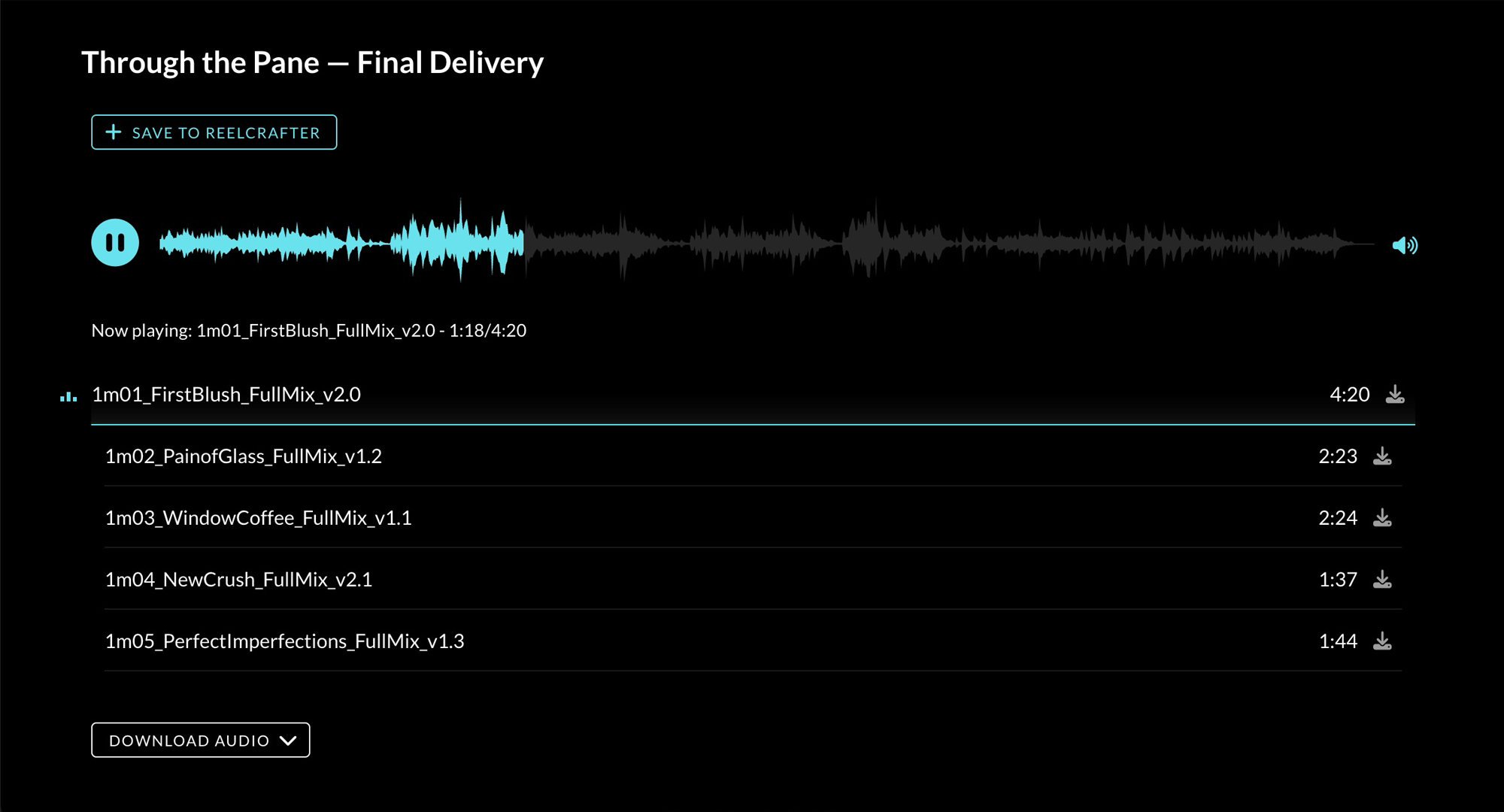
Here’s how it works. You upload your tracks once to your library. Then for each pitch, you build a reel: a presentation page that pulls from that library. The reel for the Netflix supervisor gets your orchestral drama cues, with nondestructive snippets spotlighting the strongest moments. The reel for the ad agency gets your upbeat commercial work. The reel for the game studio gets your adaptive ambient pieces.
From a single reel, you can also generate multiple share links: one for each recipient or pitch context. Every share link gets its own URL and per-link download permissions, even on the free plan. On the Professional plan, each link also carries its own password, expiration, and tracking, with the option to deliver full-quality original files (WAV, AIFF, FLAC) instead of just MP3s. You’re not duplicating playlists every time you want to send the same content to a different supervisor with different controls; you’re issuing tailored access from one source of truth. Working media composers may be juggling several active pitches at once across different supervisors, agencies, and genre briefs; ReelCrafter is designed for that multi-pitch workflow, not for a single static showreel you update quarterly.
The analytics are per-track and per-event, not just per-reel-open. For every track in a reel, you see plays, pauses, seeks, replays, and downloads with listen depth as a percentage (how much of the track was actually heard, not just whether someone clicked play) and timestamps for every event in order, plus the listener’s location and device. Everything is organized by share link, so each recipient’s activity is tracked separately.
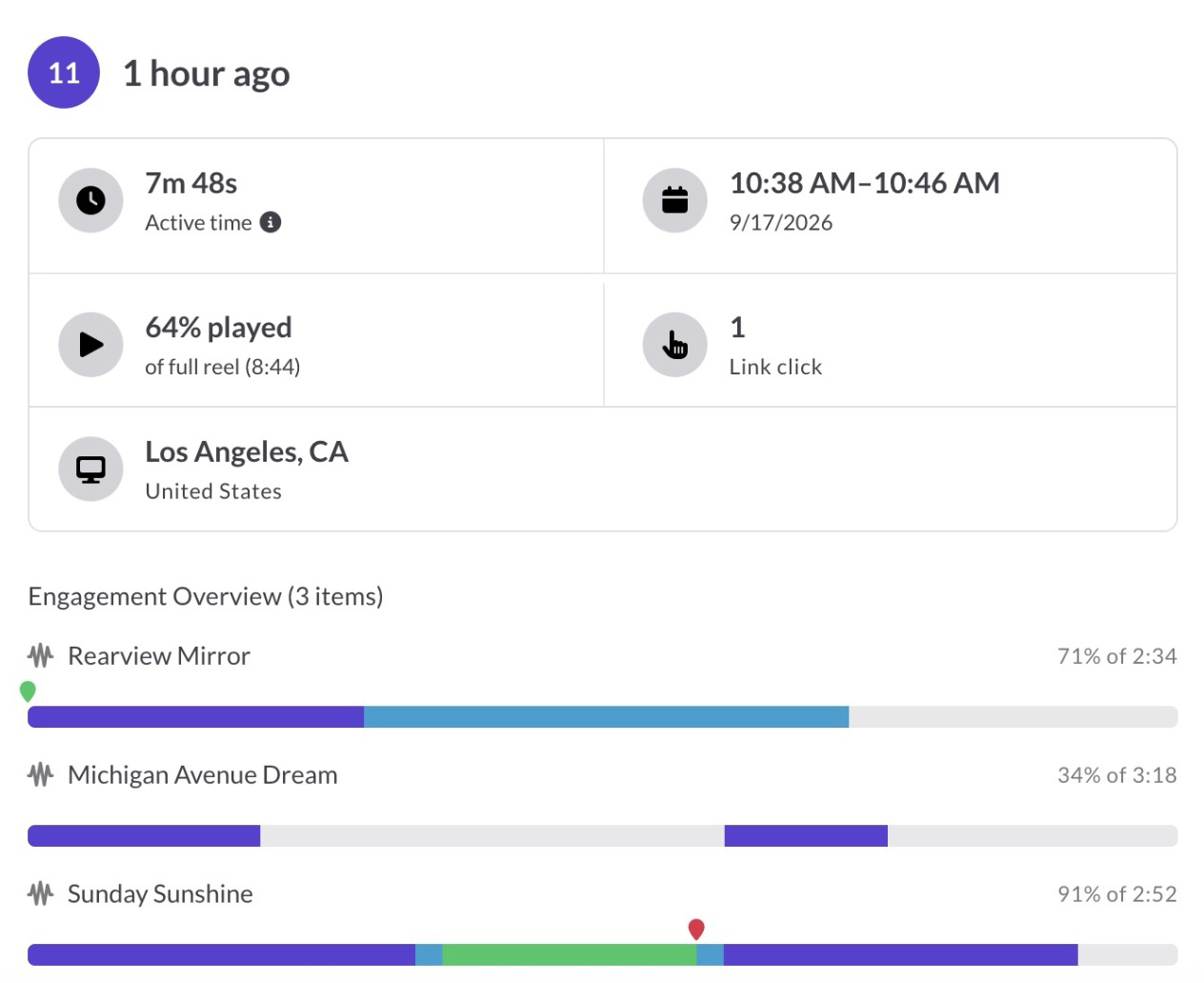
Streaming runs at 256kbps MP3 on every plan. Any metadata you’ve already embedded in your files (title, composer, ISRC, BPM, copyright, and the other standard fields) travels with them when recipients download. On the Professional plan, you can also edit and manage that metadata directly in the app with a bulk metadata editor, and recipients can download your original full-quality files (WAV, AIFF, FLAC) instead of just MP3s. No separate file transfer needed.
New in 2026: if the supervisor or director you’re pitching is also a ReelCrafter user, they can save your tracks straight into their own library via Save to ReelCrafter, with notification back to you.
Reels are private by default and you can toggle search-engine indexing on or off per reel, so a forwarded link doesn’t accidentally show up in Google. On any paid plan you can set a username and a custom slug for cleaner URLs (play.reelcrafter.com/your-username/your-reel-slug), and the custom domain add-on lets the same reel live at your own root domain or subdomain.
If you’d rather keep an existing portfolio website (Squarespace, Wix, Bandzoogle, WordPress, custom-built) and use ReelCrafter as the music layer inside it, the embedded player drops in via a single embed code. Updates you make in ReelCrafter (track swaps, color changes, playlist edits) appear on the embed automatically. Per-track play counts feed back to your dashboard; the deeper per-event analytics still apply only to reel share links, not embeds.
ReelCrafter is audio-first by design: curated tracks, pitch-specific sequencing, private share links, download controls, and per-track engagement analytics. It’s not a video-only showreel tool, but a reel can hold more than just audio. The platform hosts video (upload MP4 directly, or upload MOV and ReelCrafter converts it to MP4 for playback), supports embedded YouTube and Vimeo videos, and includes images and a Files library for downloadable attachments — PDFs (cue sheets, one-sheets, score samples, contracts), Word docs, Excel and CSV spreadsheets, ZIP archives (stems, multitrack packages), and MIDI files, up to 2GB each. Your entire pitch package lives in one link.
Pricing: Free plan with 3 reels, 5 share links, and 100 audio tracks. Starter at $10/month ($100/year) adds 10 reels and share links, unlimited audio, personalized reel URLs, and basic reel-open analytics. Professional at $25/month ($250/year) unlocks unlimited reels and share links, advanced per-track analytics, audio metadata editing, full-quality original file downloads, password protection, link expiration, 80GB of video hosting, and removes ReelCrafter branding (the small R at the bottom of pages on Free and Starter). Custom domains are a paid add-on on any plan, including Free: a Domain Pack covers five custom domains or subdomains.
Best for: Media composers (film, TV, games, advertising, sync, trailer) who pitch regularly and want pitching tools and professional visitor analytics in the same place as their portfolio. If you’re sending reels to music supervisors, directors, show runners, or creative agencies and want per-track engagement data on every link, this is built for that workflow.
Scorefolio
Scorefolio takes a different angle. It’s a portfolio platform built specifically for composers, with a strong focus on notation and score presentation. If your work involves written scores and you want to showcase both the audio and the notation side by side, Scorefolio was designed around that.
The standout feature is their browser-based score video editor. You can create score videos (those scrolling-notation-synced-to-audio videos that are all over YouTube) directly in the platform without external software. Upload a PDF score and an audio file, and Scorefolio builds the video for you with automatic page cropping.
On the Pro plan, they also include a digital score store where you can sell PDFs of your scores directly from your portfolio, with instant delivery and 0% platform fees (just standard Stripe processing). For academic and concert composers who generate revenue from score sales, that’s a meaningful feature.
The portfolio builder itself is a drag-and-drop website builder with a custom domain included on the Pro plan. Audio and video stream directly on the page. The platform also has a community and discovery component where composers can find opportunities and apply directly.
Pricing: Basic free plan with limited features. Premium and Pro tiers available, billed annually, plus institutional pricing on request. 14-day free trial. Check the Scorefolio site for current rates.
Best for: Concert and academic composers who want notation front and center, need score videos without learning video editing software, or sell digital scores. Media composers who pitch reels of recorded cues to supervisors, or send past work to directors and show runners to win bespoke composing projects, may find themselves needing additional delivery and tracking tools.
Bandzoogle
Bandzoogle is a website platform built entirely for musicians and composers. If your work involves releasing music as an artist alongside your scoring work (independent albums, soundtrack releases, original compositions you sell directly to fans), Bandzoogle was designed around that combined workflow. It’s been around since 2003 and has stayed focused on the direct-to-fan model the whole time.
The platform handles the full artist site stack: drag-and-drop website builder, audio player, video, photos, blog, bio, tour dates, mailing list, and a built-in commerce store for selling music, merch, and digital downloads with zero commission on sales. Bandzoogle also includes EPK (Electronic Press Kit) tools, crowdfunding integration, and basic SEO. A custom .com domain is included free for the life of the membership on paid plans.
For composers who function partly as recording artists (releasing soundtrack albums, selling sheet music, running a mailing list for fans), Bandzoogle covers more of that workflow in one place than Squarespace or Wix. The audio player is built specifically for music, not bolted on as a general media block.
Like the other website builders in this list, Bandzoogle is built around a multi-page artist site, not around per-recipient pitching. You can technically spin up a separate page for each supervisor or director, but each one is its own manual setup, public by default, with no per-link controls or analytics. No per-track listening analytics beyond basic site metrics. No full-quality WAV/AIFF/FLAC delivery to clients with embedded metadata.
Pricing: Lite, Standard, and Pro tiers, with annual billing discounts. 14-day free trial. Check the Bandzoogle site for current rates.
Best for: Composers who also operate as releasing artists and need an all-in-one site for music sales, mailing list, EPK, and direct-to-fan commerce. Less suited for media composers whose primary workflow is pitching cues to supervisors and directors.
Squarespace
Squarespace is the platform composers default to when they want a website that looks professionally designed without hiring a designer. And to be fair, it delivers on that. The templates are clean, the design editor is intuitive, and the result looks polished.
For a public-facing portfolio where someone Googles your name and lands on a bio, credits, and contact page, Squarespace handles it well. You can embed audio through their native audio blocks (MP3 and M4A files up to 160MB).
Squarespace also gives you multi-page architecture: separate bio, credits, contact, blog, and store pages with consistent navigation. ReelCrafter is built around a single reel page, so if you want a traditional multi-page website with internal navigation, Squarespace is the right tool for that job and ReelCrafter isn’t trying to be.
The limitations start showing up when you try to use it as a pitching tool. You can build a separate page per client, but it’s cumbersome to spin up, public by default, and offers no per-link controls. No listening analytics beyond basic page views. No control over download quality or format. No metadata management. You’re building a website, not a delivery platform.
The audio handling is also basic by music industry standards. Squarespace supports MP3 and M4A only. No WAV, no FLAC, no AIFF. For a public portfolio where someone is sampling your style, compressed audio is usually fine. For delivering full-quality files a supervisor will pull into an edit, it’s not enough.
Pricing: Basic and Core tiers billed annually, with Plus and Advanced tiers available for higher-volume commerce. No free plan; free trial available. Check the Squarespace site for current rates.
Best for: Composers who need a full multi-page website (bio, credits, blog, contact, store) for general discovery and credibility. Pair it with a dedicated pitching tool for actual client interactions.
Wix
Wix deserves a mention because it has a free tier and a dedicated music platform (Wix Music) that goes further than most general website builders. You get a professional audio player, album and playlist management, and support for WAV, FLAC, M4A, and MP3 uploads.
The catch: streaming is delivered at 128kbps MP3 regardless of what you upload. You can allow fans to download files directly, but the streaming quality is noticeably compressed. For a portfolio where a supervisor is evaluating the quality of your production and mixing, that compression can obscure some of the detail in your mix.
Wix Music also includes EPK (Electronic Press Kit) tools and gig booking integrations, which are more relevant to performing musicians than media composers. The platform allows up to 100 albums with 30 tracks each, so storage isn’t usually a constraint.
Pricing: Free tier available (with Wix branding). Paid plans include Light, Core, and Business tiers, billed annually, with displayed pricing varying by location and tax. Check the Wix site for current rates.
Best for: Composers just starting out who need something free to get their work online. Upgrade to a purpose-built platform once you’re actively pitching clients.
Other Options Worth Knowing About
WordPress + audio themes gives you the most flexibility if you’re comfortable with the technical side. Self-hosted WordPress with an audio-focused theme can display music beautifully, and you control everything. But you’re also responsible for everything: hosting, security updates, plugin compatibility. There are no built-in analytics or pitch-specific features unless you build them yourself. Some composers love the control. Most find it’s a time sink that pulls them away from writing music.
SoundCloud still gets used as a makeshift portfolio by some composers, but it’s a streaming platform, not a portfolio tool. The experience for a music supervisor is a public feed with play counts visible, comments from strangers, algorithmic recommendations pulling attention away from your tracks, and no per-recipient tracking or password protection. It works for building a public audience. It undermines a professional pitch.
The Full Comparison
Here’s how these platforms compare on the features that matter most for composers. Each platform’s top-tier capability is shown; see the body sections above for per-plan limits and pricing. Details based on public documentation and pricing pages as of May 2026; features may have changed since.
| Feature | ReelCrafter | Scorefolio | Bandzoogle | Squarespace | Wix |
|---|---|---|---|---|---|
| Built for | Client pitching and delivery | Notation-focused portfolios | Direct-to-fan artist sites with built-in commerce | General websites | General websites |
| Personalized pitch links | Unlimited share links per reel, each with its own password, expiration, download permissions, and tracking | No | No | No | No |
| Professional visitor analytics | Per-share-link tracking on Professional: opens, plays, pauses, seeks, replays, downloads, listen depth (%), approximate location, device, event timeline | Analytics available on paid plans (specific metrics not publicly documented) | Music plays, visitor locations, traffic sources, page analytics, fan/subscriber growth, sales metrics | Website traffic and page-view analytics | Per-track plays, shares, downloads, purchases, listener country, device type, trends over time |
| Audio formats | MP3, WAV, AIFF, FLAC, M4A/AAC uploads (streams at 256kbps MP3) | Audio files (formats not specified publicly) | MP3, WAV, FLAC uploads; streaming rendered as MP3 | MP3, M4A only | WAV, FLAC, M4A, MP3 (streams at 128kbps MP3) |
| Full-quality original file downloads | WAV, AIFF, FLAC on Professional plan | Not documented | For paying fans through the built-in store | No | MP3 or FLAC downloads (FLAC when source supports it) |
| Metadata editing | Full ID3 editing + bulk editor on Professional plan; metadata embedded in all downloads | Not documented | Track name, artist, ISRC, notes, lyrics; ID3 options for downloads | No | Track name, genre, cover art |
| Video hosting | Native upload (up to 150 min per file; 80GB storage on Pro) + YouTube/Vimeo embeds | Score-synced video player; video uploads on Pro | Video headers only (30MB max); YouTube/Vimeo embeds for general video | Native upload (30 min storage on free; more with paid plans; 500MB per file) + YouTube/Vimeo embeds | Native upload (500MB free, scales up to unlimited on Business Elite; 15GB per file) |
| Score notation display | PDF attachments and image galleries | Built-in score video editor, score display | PDF embed or image gallery | PDF embed or image gallery | PDF embed or image gallery |
| Custom domain | Paid add-on, any plan (Domain Pack: 5 domains or subdomains) | Pro annual plan | 1 free .com for life of membership | 1 free, first year only | 1 free, first year only |
| Built-in commerce / store | No (delivery, not sales) | Score sales on Pro, 0% commission | Full music + merch store, 0% commission | E-commerce on Core plan and up | E-commerce on higher plans |
| Free plan | Yes (with small R branding) | Yes (basic features) | 14-day trial | Trial only | Yes (with Wix branding) |
| Paid tiers (see vendor for current rates) | Starter $10/mo, Professional $25/mo (annual billing discount) | Premium, Pro, Institutional | Lite, Standard, Pro | Basic, Core, Plus, Advanced | Light, Core, Business |
Which Portfolio Platform Is Right for You in 2026?
The answer depends on what “portfolio” actually means in your day-to-day work.
If you need a public homepage that establishes credibility when someone Googles your name, a website builder like Squarespace or Wix handles that well. People find you, see your credits, hear a few samples, and reach out. That’s a homepage doing its job.
If your work centers on notation and score sales, Scorefolio was built for that specific workflow. The score video editor alone saves hours compared to building those videos manually in a video editor.
If you’re a media composer (film, TV, games, advertising, sync, trailer) actively pitching projects, and your income depends on supervisors, directors, show runners, and creative agencies actually listening to and responding to your music, you need more than a homepage. You need pitch tools with engagement data on every link, built around the multi-pitch workflow itself. That’s what ReelCrafter is built around, and has been since 2016.
A lot of working composers end up with two tools: a website for public discovery, and ReelCrafter for everything that happens after someone says “send me your work.” The website gets them found. ReelCrafter gets them hired.
Here’s what that looks like in practice. A music supervisor from an ad agency emails asking for five cues that match the mood of their campaign. Instead of zipping WAVs and uploading them to Google Drive, you spend ten minutes building a reel in ReelCrafter: five tracks, renamed to match the brief, with snippets leading with the strongest moments. You send one link. She opens it, hears exactly what she needs, and if she wants to move forward she can grab the full-quality WAVs with metadata embedded. The next morning, you can see which tracks she played and you know whether the pitch actually landed before you follow up.
Portfolio websites help composers get discovered. Pitching platforms help composers get hired. Those are related jobs, but they aren’t the same job.
The website gets them found. ReelCrafter gets them hired.
If you don’t have a ReelCrafter account yet, build your first reel free and see how it compares to what you’re using now. Upload a few tracks, build a reel, send a link, and see what happens next.
Plan and feature details for all platforms in this article reflect publicly available information at time of publication and may have changed since. Verify current details on each platform’s official site before signing up.
Frequently Asked Questions About Composer Portfolio Websites
How do I make a portfolio for composing?
It depends on whether you’re building a general portfolio for discovery or a targeted portfolio for a specific pitch. A general portfolio can run a little longer (around 10 to 15 pieces) and should be organized by genre, mood, or project type so a visitor can self-select what they want to hear. A targeted portfolio (the kind you send to a specific supervisor, director, or show runner) should be more like five to seven tracks curated to fit that project, not your full body of work. Write a short bio that focuses on your credits and the types of projects you’re looking for. For the general version, a website builder like Squarespace or Wix works well for the homepage. For targeted pitches, use a platform like ReelCrafter that lets you build a tailored presentation per recipient with only the tracks relevant to their project.
What should be in a music composer portfolio?
A strong composer portfolio includes your best work (quality over quantity), organized by genre or mood so listeners can quickly find what they need. Include a professional bio with notable credits and a clear contact method. Video excerpts can help when they’re relevant to the pitch, but for sync or film work it’s often better to lead with audio so the listener isn’t distracted by someone else’s footage. If you use a platform that supports it, attach downloadable files alongside your tracks — cue sheets, score samples, one-sheets, stems or multitrack ZIPs, MIDI files, or a contract PDF if you’re sending a project package. For media composers, fewer well-chosen tracks beat a long list of everything you’ve ever written.
Can I use Squarespace or Wix as a composer portfolio?
Yes, both work well as a public-facing multi-page portfolio for general discovery. Squarespace supports MP3 and M4A audio blocks with clean templates and a full multi-page architecture (bio, credits, contact, blog, store). Wix offers a dedicated music player with WAV/FLAC upload support, though streaming is delivered at 128kbps MP3. Both are limited as pitching tools: per-recipient pages are cumbersome to spin up and aren’t private by default, with no listening analytics. Squarespace doesn’t offer full-quality file delivery to clients, and Wix’s downloads are limited to MP3 or FLAC (no WAV). Many composers run both: a Squarespace or Wix site for the multi-page homepage and a separate ReelCrafter account for client-facing delivery and pitching.
Can I use ReelCrafter audio inside my existing portfolio website?
Yes. ReelCrafter offers embedded players that drop into any external website (Squarespace, Wix, WordPress, custom-built) via a single embed code. Bandzoogle also works since it supports third-party HTML embeds. Even if your site builder has its own media player, pulling from ReelCrafter means your entire music library stays in one place rather than getting maintained separately across two tools. The embed is mobile-responsive and customizable to match your site’s colors. Once it’s on your page, anything you change in ReelCrafter (swap a track, replace a file, reorder the playlist, add or update track notes, change the player colors) updates on your site automatically without re-uploading or replacing the embed code. Per-track play counts from the embed feed back into your ReelCrafter dashboard (the deeper per-event analytics like plays, pauses, seeks, and replays only apply to full reel share links, not to embedded players). Many composers run it this way: a Squarespace or Wix site for the multi-page portfolio plus ReelCrafter embeds for the actual audio, with a separate ReelCrafter reel link for sending personalized pitches to supervisors.
What is the best free portfolio platform for composers?
ReelCrafter, Scorefolio, and Wix offer free plans; Bandzoogle offers a free trial rather than a permanent free tier. Wix’s free plan includes their music player and basic website builder but displays Wix branding. ReelCrafter’s free plan lets you build and share reels with core features but displays a small ReelCrafter R at the bottom of each reel page (removed on Professional). Scorefolio’s free Basic plan covers core profile and limited features. For a composer just starting out, either ReelCrafter’s free plan (for pitching and delivery), Wix’s free tier (for a basic public portfolio), or Scorefolio’s Basic plan (for notation-focused work) provides a solid starting point without financial commitment.
Is Scorefolio or ReelCrafter better for composers?
They solve different problems. Scorefolio is built around notation: score video creation, score display, and digital score sales. It’s strongest for concert and academic composers whose work involves written scores. ReelCrafter is built around pitching and delivery: personalized presentation links, listening analytics, full-quality original file downloads with embedded metadata, and video hosting. It’s strongest for media composers (film, TV, games, advertising) who pitch recorded music to supervisors and directors. If your work spans both worlds, you might use Scorefolio for your concert music and ReelCrafter for your media work.
Is ReelCrafter only for video showreels?
No. ReelCrafter is an audio-first pitching and delivery platform for media composers. The core workflow is curated audio tracks with pitch-specific sequencing, private share links, per-recipient download controls, and per-track engagement analytics. Video is one supported media type inside a reel (MP4 playback, with MOV uploads converted to MP4, plus YouTube and Vimeo embeds), but the platform is built around audio pitching and delivery, not video presentation.
Can I run multiple active pitches at the same time with ReelCrafter?
Yes. ReelCrafter handles a single static showreel just fine if that’s all you need, but it’s designed for composers running multiple active pitches at once. On the Professional plan, you can create unlimited reels per account and unlimited share links per reel, with each share link carrying its own URL, password, expiration, download permissions, and tracking. Many working media composers in film, TV, games, advertising, sync, and trailer music are pitching across several supervisors, agencies, and genre briefs in any given week, and the architecture is built for that reality.
What analytics does ReelCrafter give the composer?
Per-track and per-event analytics, not just reel-open counts. For every track in a reel, you see plays, pauses, seeks, replays, and downloads with listen depth as a percentage (how much of the track was actually heard) and timestamps for every event. Plus the recipient’s location and device. All organized by share link, so when you send the same reel to multiple supervisors via separate share links, you know exactly which supervisor played which tracks, how much of each, and what they downloaded. Advanced analytics are on the Professional plan with 12 months of retention.
Who uses ReelCrafter?
Thousands of working composers across film, TV, games, advertising, and sync. The user base includes Emmy-winning composers, working sync writers, game audio professionals, and composers at every career stage from emerging to established. Many of those composers actively shape what gets built into the platform: feature priorities, workflow improvements, and the everyday details that make a tool fit the real work of pitching. That direct feedback loop is part of why ReelCrafter has stayed close to how media composing actually works, since 2016.
Do music supervisors care which portfolio platform you use?
Most music supervisors care about the experience, not the platform name. They want to tap a link, hear music immediately without signing up or downloading anything, and grab the full-quality files when they’re ready. Clean metadata, fast streaming, and easy downloads matter far more than which logo is in the corner. That said, a polished, curated presentation makes a noticeably better impression than a Google Drive folder or a SoundCloud page with public play counts and algorithmic recommendations competing for attention.
Who built ReelCrafter and how long has it been around?
ReelCrafter was built in 2016 by award-winning composer Sam Hulick (best known for the Mass Effect trilogy) who needed a better way to send his own music to clients and couldn’t find one. He brings 25+ years of software development experience to the problem and shaped what’s now a standard composer pitch workflow. Sara Pocius co-founded the company and works alongside Sam on product, design, and brand.